
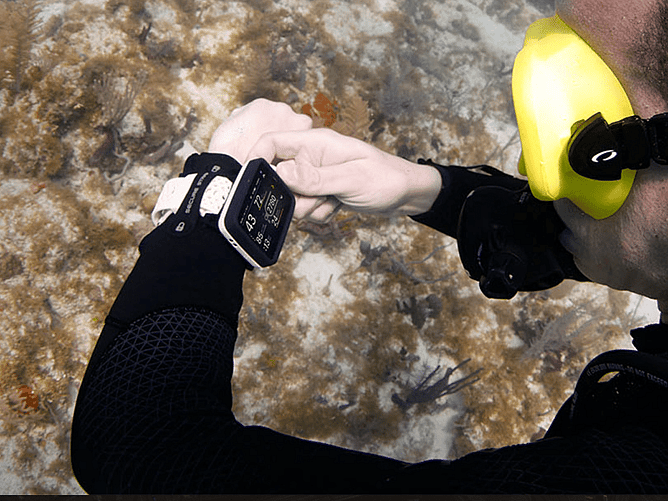
A new generation of diving technology?
Oceanic O.i Wrist Dive Computer Review – A New Generation of Diving Technology?
Aotearoa Dive | Equipment Reviews
There are plenty of dive computers on the market, but every now and then a new model comes along that makes you stop and take a closer look. The new Oceanic O.i Wrist Dive Computer is one of those products.
Oceanic has taken a fresh approach to what a modern dive computer should offer, combining a large full-colour display, a completely new control interface, wireless air integration, GPS, an electronic compass and some interesting additional features that could make life underwater considerably easier.
But diving equipment isn’t just about impressive specifications. A dive computer needs to be practical, intuitive and, above all, easy to read and operate when you’re underwater. It needs to provide the information you need without distracting you from the dive itself.
So, what is the Oceanic O.i actually bringing to the table, who is it designed for, and is it worth considering as your next dive computer?
Grab a cup of tea and let’s take a closer look.
First impressions – A very different-looking dive computer
The first thing that stands out about the Oceanic O.i is its display.
Forget the traditional small monochrome screens that we’ve become accustomed to seeing on many recreational dive computers. The O.i features a generous 2.4-inch (6.1 cm) full-colour TFT display, providing considerably more screen real estate for presenting dive information.
This is a welcome development.
When you’re underwater, you don’t necessarily want to be squinting at a collection of small numbers and symbols. You want to be able to glance at your computer and immediately understand your depth, dive time, decompression status and other important information.
Oceanic has clearly put considerable thought into the display layout, using colour coding and intelligent screen organisation to help distinguish important information.
The display automatically adjusts its brightness depending on the surrounding lighting conditions, which should be particularly useful when moving between bright, shallow water and darker environments.
For divers exploring the lakes around Rotorua, diving in the Bay of Plenty or heading out to New Zealand’s coastal dive sites, having a clear, easy-to-read display is certainly something worth appreciating especially in what can sometimes be poor visibility.
The overall design is modern, functional and unmistakably different from the traditional wrist-mounted computers we’ve seen over the years.
The NavDial – A clever alternative to traditional buttons
One of the most interesting features of the O.i is its new NavDial control system.
Rather than relying on the usual arrangement of two, three or four buttons, Oceanic has introduced a rotary dial combined with a push-button function.
The concept is straightforward.
Rotate the dial to scroll through menus and information, press to select, and use a longer press to return to the previous screen.
It’s a simple approach, but potentially a very useful one.
Anyone who has spent time operating a dive computer wearing thick neoprene gloves or dry gloves will understand the frustration of trying to locate and press small buttons.
The NavDial is designed to make navigation more intuitive, with the ability to operate the interface using one gloved hand.
The controls can also be configured for left- or right-handed use, which is a nice touch.
We particularly like the thinking behind this design. A dive computer shouldn’t require you to spend half your dive navigating menus. The important information should be readily available, and the controls should be easy to operate without taking your attention away from your surroundings.
It’s a different approach from the traditional button-operated computers, and one that makes the O.i stand out.
Underwater display and readability
For us, display readability is one of the most important considerations when choosing a dive computer.
You can have all the features in the world, but if you can’t comfortably read the information underwater, they’re not going to be much use.
The O.i’s large colour display is one of its strongest selling points.
The intelligent display layout prioritises relevant dive information, while colour coding helps distinguish different readings and alerts.
This is particularly useful when monitoring several pieces of information simultaneously.
With compatible wireless air integration, for example, you can have your depth, remaining no-decompression time, cylinder pressure and estimated gas time remaining available together.
That’s a considerable amount of useful information presented on your wrist.
The automatic brightness adjustment is another practical addition, helping the display adapt to changing light conditions.
It’s worth remembering that screen technology always needs to be considered in the context of the type of diving you’re doing. A large display is great, but divers should also consider how it fits over their exposure suit, whether it interferes with other wrist-mounted equipment and how comfortable it is during longer dives.
Bühlmann ZHL-16C – A serious decompression algorithm
One of the most significant features of the Oceanic O.i is the decompression algorithm powering the computer.
Oceanic has incorporated the well-established Bühlmann ZHL-16C algorithm with adjustable Gradient Factors.
This is particularly interesting because Bühlmann is widely recognised throughout the technical diving community.
The algorithm provides the foundation for calculating nitrogen tissue loading, decompression obligations and ascent information.
The addition of adjustable Gradient Factors allows divers to customise the conservatism of their decompression settings.
For divers familiar with technical diving computers, this will be a welcome feature.
It also gives recreational divers an opportunity to understand and explore a decompression model that is widely used across different levels of diving.
However, having access to adjustable Gradient Factors doesn’t automatically make a computer suitable for every technical diving application. Divers must understand the implications of their settings and use the computer within its intended operating limits.
The O.i supports recreational scuba and gauge modes, with multi-gas capability for up to three gas mixes.
Nitrox settings range from 22% to 100% oxygen, with individual PPO₂ management and maximum operating depth information for configured gases.
This gives the O.i considerably more flexibility than a basic single-gas recreational computer.
Wireless air integration – Your cylinder pressure on your wrist
Wireless air integration has become an increasingly popular feature, and it’s something I think many divers appreciate once they’ve experienced it.
The Oceanic O.i supports wireless air integration through an optional Oceanic wireless transmitter.
Once paired, cylinder pressure information is displayed directly on the computer.
This means you can monitor your remaining gas without having to constantly look down at a separate analogue pressure gauge or console.
The system also provides additional information, including estimated gas time remaining (GTR) and real-time air consumption information.
Gas Time Remaining is particularly useful because it considers your current breathing rate and depth when estimating how long your available gas supply will last.
Of course, it’s an estimate rather than a guarantee, and it should never replace proper gas planning, reserve management or regular monitoring of your cylinder pressure.
Another interesting feature is the ability to connect up to three wireless transmitters simultaneously.
This opens up some useful possibilities for divers using multiple cylinders and different gas configurations.
One important consideration is that the transmitter is an additional purchase rather than something included as standard with the computer.
For divers already using wireless air integration, this is worth factoring into the overall cost.
The benefits are obvious: less equipment hanging around your first stage, fewer hoses and a cleaner configuration.
For sidemount divers in particular, the ability to monitor multiple cylinders from one wrist-mounted display is an attractive proposition.
Digital compass – Navigation without additional equipment
The O.i also incorporates a three-axis tilt-compensated digital compass.
This is another feature that we think deserves attention.
A compass is an essential piece of navigation equipment for many divers, whether you’re exploring a reef, navigating a wreck or following a planned underwater route.
The O.i’s electronic compass includes bearing lock, reciprocal heading display and heading memory.
The tilt compensation means the compass is designed to maintain accurate directional information without requiring the computer to be held perfectly level.
You can access the compass directly from the dive screens using the NavDial.
There’s also an integrated timer, which can be useful when following navigation plans or managing timed underwater activities.
Having a compass integrated into the computer means one less piece of equipment to attach to your wrist or BCD.
Naturally, divers should still understand compass navigation and carry appropriate backup equipment when their dive plan requires it.
Something a little different – The digital dive slate
Here’s a feature that genuinely makes the O.i interesting.
Oceanic has incorporated a digital dive slate into the computer.
Rather than carrying a separate slate or relying entirely on wet notes, divers can prepare information in advance through the Oceanic+ application and transfer it to the computer.
This information can then be accessed underwater.
There are several potential applications for this.
For recreational divers, it could be used to store dive plans, navigation notes, important reference information or reminders.
For instructors, it offers some particularly interesting possibilities.
Imagine preparing a list of skills for a student before entering the water, then having those instructions available directly on your wrist during the training dive.
It could also be useful for communicating procedures, equipment configurations and other information to a buddy.
For technical divers, having dive plan information readily accessible is another potential advantage.
It’s not intended to replace proper dive planning, team communication or the use of appropriate wet notes where these are required.
However, it’s a clever addition that could prove genuinely useful.
It’s also something that differentiates the O.i from many other computers in its price category.
GPS and dive logging
Another feature included in the O.i is built-in GPS functionality.
The GPS records your surface entry and exit positions, allowing you to associate your dives with their geographical locations.
This is a particularly useful feature for divers who regularly explore different dive sites.
If you’ve ever returned from a trip with a collection of dive logs and tried to remember exactly where each dive took place, you’ll understand the attraction.
Combined with the Oceanic+ application, the O.i allows you to synchronise dive information, review your dive history and manage computer settings.
The GPS also assists with automatic altitude adjustment.
This is particularly relevant here in New Zealand, where freshwater diving and altitude-related diving considerations can form part of the diving experience.
It’s worth noting that GPS positioning is a surface function. GPS signals don’t provide underwater navigation in the way that some people might initially assume.
Battery and charging – A modern approach
The Oceanic O.i uses an internal rechargeable lithium-ion battery rather than a conventional user-replaceable battery.
Charging is handled through a wireless induction charging system.
Oceanic claims up to approximately 20 hours of diving operation from a full charge, depending on operating conditions.
The manufacturer also states that the battery can reach approximately 80% charge in around 30 minutes under normal charging conditions.
We like the convenience of rechargeable dive computers, particularly when charging is straightforward and there’s no need to worry about opening battery compartments or replacing seals.
The sealed design also removes the need for routine battery-compartment opening by the user.
However, there’s one consideration worth mentioning.
If you’re heading away on a diving holiday or planning several consecutive days of diving, battery management becomes part of your pre-dive preparation.
We would recommend getting into the habit of charging the computer before a trip and checking the battery level as part of your regular equipment checks.
The supplied charging kit and protective EVA storage case make travelling with the computer more convenient.
Comfort and mounting options
The O.i comes supplied with two mounting options.
You get a conventional adjustable silicone wrist strap as well as an elastic bungee mounting system.
This is a useful inclusion because different divers have different preferences.
The silicone strap is convenient for everyday recreational diving and general wear.
The bungee arrangement is particularly appealing for drysuit and technical divers who want something that can be adjusted easily over thicker exposure suits.
It also provides a secure mounting option without relying on conventional buckle adjustments.
At approximately 100 grams, the O.i is a relatively substantial wrist-mounted instrument, and its 2.4-inch display naturally means it’s larger than a traditional watch-style dive computer.
That’s the trade-off for having such a generous screen.
Personally, we think most divers considering this type of computer will appreciate the larger display more than they’ll miss the compact dimensions of a traditional watch-style model.
What could be better?
No equipment review would be complete without looking at the potential drawbacks.
First, the size.
The large colour display is a major advantage, but it’s not going to appeal to everyone. Divers who prefer small, unobtrusive wrist computers may find the O.i a little too substantial.
Secondly, the rechargeable battery.
Although induction charging is convenient, some divers will always prefer a computer with a replaceable battery, particularly when travelling to remote destinations.
Thirdly, wireless air integration is an additional expense.
If you want to take full advantage of the O.i’s air integration capabilities, you’ll need to budget for the compatible transmitter or transmitters.
Finally, the O.i has a considerable number of features.
While the NavDial is designed to simplify operation, divers will still need to spend time becoming familiar with the menus, settings and different functions before relying on the computer underwater.
We would strongly recommend reading the manual, configuring the computer properly and becoming comfortable with its operation before taking it on an important dive.
These aren’t necessarily deal-breakers, but they’re worth considering when comparing the O.i with other computers.
Who is the Oceanic O.i best suited to?
We think the O.i has the potential to appeal to a fairly broad range of divers.
Recreational divers
For recreational divers looking for something more advanced than a basic entry-level computer, the O.i offers a generous display, intuitive controls, Nitrox capability, GPS and optional air integration.
Advanced recreational divers
Divers regularly exploring deeper sites, wrecks and more challenging environments will appreciate the additional information, integrated compass and flexible decompression settings.
Sidemount divers
The ability to connect multiple transmitters is particularly interesting for sidemount configurations. Having the pressure from multiple cylinders displayed on one computer is a useful advantage.
Instructors
The digital dive slate is an interesting addition for instructors. Being able to prepare skill reminders, procedures and reference information before a training dive could make it a useful teaching tool.
Divers interested in technical diving
The Bühlmann ZHL-16C algorithm, adjustable Gradient Factors and multi-gas capability give the O.i some attractive features for advanced divers.
However, its intended operating modes and limitations need to be understood. It should not automatically be considered a replacement for a dedicated technical diving computer in more demanding decompression applications.
Final verdict – Is the Oceanic O.i worth considering?
Oceanic has clearly tried to do something different with the O.i, and I think that’s a good thing.
Rather than simply producing another wrist computer with a slightly improved display or another collection of menu options, they’ve looked at how divers interact with their equipment and introduced some genuinely interesting ideas.
The large full-colour display is a major attraction. The NavDial offers an alternative to traditional button controls, while wireless air integration, GPS, an electronic compass and the digital dive slate add plenty of functionality.
The inclusion of the Bühlmann ZHL-16C algorithm with adjustable Gradient Factors is also a significant feature, particularly for divers who appreciate having more control over their decompression settings.
There are compromises, of course. It’s larger than a conventional watch-style computer, the transmitter is an additional purchase and rechargeable batteries won’t suit everyone’s preferences.
But overall, the O.i looks like a very interesting addition to Oceanic’s range.
What we particularly like is that many of its features have a practical purpose. The digital slate, for example, isn’t just another gimmick if you’re an instructor or someone who regularly plans and executes more involved dives.
Likewise, the large display and simplified control system address two of the most common frustrations divers experience with traditional computers.
Our take at Aotearoa Dive: The Oceanic O.i is a compelling next-generation wrist computer that combines recreational convenience with some genuinely advanced functionality. It’s worth a serious look if you’re considering upgrading your current dive computer, particularly if you want a large colour display, wireless air integration and the flexibility of a Bühlmann-based decompression system. The best selling point for this computer is the price and what features you get for your money, there is simply nothing else comparable on the market.
As always, the best dive computer is the one you understand, configure correctly and can operate confidently underwater.
And on paper, the Oceanic O.i certainly gives divers plenty to get excited about.
Interested in the Oceanic O.i?
Get in touch with the team at Aotearoa Dive to discuss the Oceanic O.i, compatible wireless transmitters and whether it’s the right computer for your diving.
Find out more information on the Oceanic O.i. wrist dive computer by CLICKING HERE.
Visit www.aotearoadive.co.nz or come and talk to us about your next dive computer upgrade.
Dive safe. Dive smart. Dive Aotearoa.